
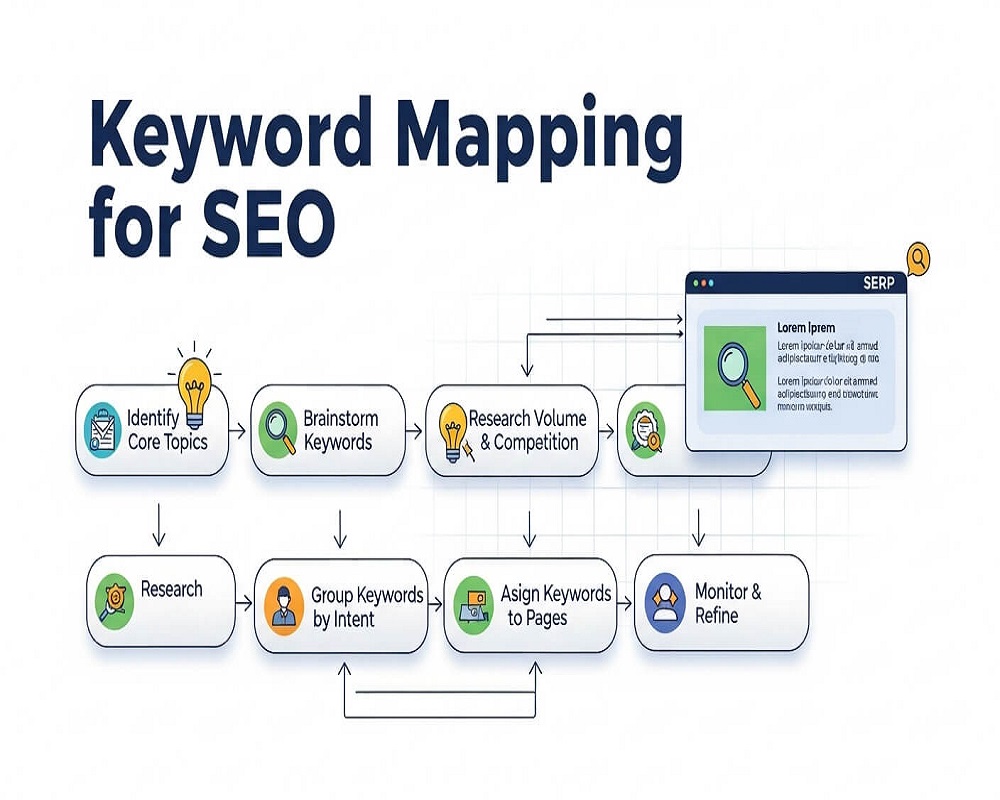
Short answer: Keyword mapping means assigning each group of keywords that share the same search intent to one page on your site. Collect keywords, group them by intent (not by wording), match each group to an existing page or a page you will create, and record it in a spreadsheet with the URL, primary keyword and status. One intent, one page: that prevents your own pages competing and shows where content is missing.
This guide is for site owners, content managers and SEOs who have a keyword list but no clear plan for which page should rank for what. You will be able to build a working keyword map in a spreadsheet, decide when two keywords belong on one page or two, fix pages that compete with each other, and turn the map into a content plan.
What is keyword mapping?
A keyword map is a document, usually a spreadsheet, that connects every important keyword group to one URL. Each row says: this page targets this primary keyword, these close variants, this search intent, and here is its current status.
It answers three practical questions at once:
- Which page should rank for this search? So everyone optimises and links to the same page.
- Do two pages target the same thing? So you can merge or reposition them before they compete.
- Which searches have no page at all? So you know what to create next.
Why map groups, not single keywords
Older advice said “one keyword per page”. That no longer fits how search works. Ahrefs’ study of 3 million queries found the average page ranking number one also ranks in the top 10 for nearly 1,000 other relevant keywords, with a median of around 400. A single good page on “keyword mapping” will rank for “keyword mapping template”, “what is keyword mapping” and “how to map keywords to pages” without separate pages. So a modern map assigns a topic and intent to each page, with one primary keyword as its label.
How to do keyword mapping, step by step
1. Collect your keywords
Start with what already works, then add what you want. Sources I use, in order:
- Search Console: the queries each page already gets impressions for. This shows what Google already associates with your pages. My Search Console Performance report guide shows how to export them by page.
- Keyword tools: Google Keyword Planner, Semrush, Ahrefs or similar for volume and new ideas. See my full process for keyword research.
- Competitors: keywords that similar sites rank for and you do not. My guide to competitor analysis covers this.
- Customers: the words used in enquiries, WhatsApp messages and sales calls. Google’s SEO Starter Guide puts it simply: think about the words a user might search for to find your content.
2. Label intent and group by the results page
Mark each keyword as informational, commercial, transactional or local. Then group them. The most reliable grouping method I know is the results page itself: if two keywords show mostly the same top results, Google treats them as the same intent, and they belong on one page. If the results are different, they need different pages, however similar the wording looks. My guide to search intent explains the types, and topic clustering shows how to group at scale.
3. Inventory your existing pages
Crawl the site or export your sitemap, and list every indexable URL with its title, main heading and the top queries it already receives. Many groups will already have a natural home.
4. Assign each group to one URL
For each group, pick the page that best matches the intent and already has the most signals (clicks, links). If nothing fits, mark it as a new page to create. Never assign the same group to two URLs.
5. Record it in the map
Use the template below. Keep it in a shared sheet so writers, developers and whoever handles links all work from the same version.
6. Optimise each page for its group
Put the primary keyword in the title tag, main heading and opening paragraph, and cover the questions in its group as sections. My title tag guide covers the first element, which matters most for clicks.
7. Link pages according to the map
When any article mentions a mapped topic, link to the mapped URL with a descriptive anchor. This tells Google which page you consider the main one. See my guide to internal linking.
Rather have an expert do this for you?
Hand it over and get back to running your business.
A keyword map template you can copy
This is the column set I use. The rows show an illustrative map for a dental clinic site in Karachi (not a real client).
| URL | Primary keyword | Close variants | Intent | Page type | Status |
|---|---|---|---|---|---|
| /dental-implants/ | dental implants karachi | implant dentist karachi, tooth implant cost | Commercial / local | Service page | Optimise |
| /blog/dental-implant-cost-pakistan/ | dental implant cost in pakistan | implant price pakistan, single tooth implant cost | Informational (price research) | Guide | Create |
| /root-canal-treatment/ | root canal treatment karachi | RCT karachi, root canal specialist | Commercial / local | Service page | Done |
| /blog/root-canal-vs-extraction/ | root canal vs extraction | should I get a root canal or pull the tooth | Informational (comparison) | Guide | Create |
| /contact/ | dentist gulistan e johar | dental clinic near johar | Local | Contact / location | Optimise |
Useful extra columns: monthly volume for the whole group, current position, last updated date and owner. Keep the map readable; a map nobody opens is no use.
Worked example: one page or two?
“Dental implants Karachi” and “dental implant cost in Pakistan” look like they belong together. When I search both, the first shows local clinic pages and a map pack; the second shows price guides and articles. Different results mean different intent, so they get separate pages: a service page and a guide that links to it.
By contrast, “root canal treatment Karachi” and “RCT Karachi” show nearly the same clinics and pages. Same intent, so “RCT” is just a variant on the root canal page, used once in the text and perhaps in an FAQ. Creating a separate “RCT” page would split signals and compete with the main one.
Keyword mapping checklist
Build and maintain your keyword map
- Export current queries: Search Console queries per page, last 12 months.
- Add new ideas: keyword tools, competitors and customer language.
- Remove irrelevant keywords: anything you cannot genuinely serve.
- Label intent: informational, commercial, transactional or local.
- Group by shared results: same top results means same page.
- Inventory pages: every indexable URL with title, H1 and top queries.
- Assign one URL per group: no group mapped to two pages.
- Flag gaps: groups with no page become “Create” rows.
- Flag overlaps: two pages chasing one intent get a merge or reposition decision.
- Optimise mapped pages: title, H1, intro and sections match the group.
- Align internal links: anchors for a topic point to its mapped URL.
- Review quarterly: check Search Console for pages ranking for queries mapped elsewhere.
Ticks are saved in your browser, so you can work through the map over several sessions.
Fixing overlaps found by the map
The map often reveals two pages chasing the same intent. In Search Console, filter by the query and look at the Pages tab: if two URLs swap impressions for the same query, they are competing. My guide to keyword cannibalisation goes deeper, but the usual fixes are:
- Merge and redirect: combine the best of both into the stronger URL and 301 redirect the other.
- Reposition: change one page to a genuinely different intent (for example, from “service” to “cost guide”) and update its title and links.
- Canonicalise: for near-duplicate pages that must both exist, such as filtered product listings, point a canonical tag at the main version. Google’s guide to consolidating duplicate URLs explains when redirects and canonicals each fit.
Mistakes I see in keyword maps
- Grouping by wording instead of intent. “SEO course” and “SEO services” share a word and nothing else.
- One page per city or variant. On Pakistani service sites I often find “plumber Karachi”, “plumber in Karachi” and “Karachi plumber” as three pages. That is one intent and one page.
- Mapping only blog posts. Service, category and product pages need rows too; they usually carry the commercial keywords.
- Ignoring Roman Urdu and mixed queries. If customers search “AC mistri near me” and “AC repair”, note both as variants on the same row so writers use them.
- Building the map once. New pages get published without checking it, and overlaps creep back within months.
- Stuffing every variant into the page. Variants are for coverage and natural wording, not repetition. My guide to related keywords explains the difference.
How to measure whether the map works
Track the mapped URL, not just the keyword. In Search Console, check that impressions and clicks for each group’s queries are going to the mapped page, that competing URLs are dropping out, and that new “Create” pages start earning impressions within a few months. Better positions matter because clicks fall away quickly below the top: Backlinko’s CTR study of 4 million results found the number one result averaged a 27.6% click-through rate.
Frequently asked questions
How many keywords should I map to one page?
One primary keyword plus every close variant that shares the same intent and results. That might be 3 or 30. The limit is intent, not a number; if a keyword brings different results, it needs a different page.
What is the difference between keyword mapping and keyword research?
Keyword research finds the searches worth targeting. Keyword mapping decides which page targets each group. Research produces a list; mapping turns it into a site plan.
What is the best tool for keyword mapping?
A shared spreadsheet is enough for most sites. Use Search Console for current queries and any keyword tool for volume and ideas. Clustering tools help on very large lists, but check their groups against the actual results page.
Does keyword mapping prevent keyword cannibalisation?
It prevents most of it, because every intent has a single owner page and writers can see it before publishing. It also makes existing cannibalisation easy to spot when two URLs appear for the same row.
How often should I update a keyword map?
Add rows whenever you plan new content, and review the whole map every quarter. Also review it after a site migration, a redesign or a big change in your services.
Sources
- Ahrefs, study of 3 million queries on how many keywords top-ranking pages also rank for (2017).
- Backlinko, “Google organic click-through rate” study of 4 million search results (2019, updated 2025).
- Google Search Central, “SEO Starter Guide” (last updated 2025).
- Google Search Central, “How to specify a canonical URL with rel=canonical and other methods” (documentation).
If you want a keyword map built for your site, with overlaps resolved and gaps turned into a content plan, that is part of my on-page optimisation service. You can also ask me about your site.
Request received
Thank you! Saad will contact you within the next 24 hours.
Keep an eye on your phone and inbox.