
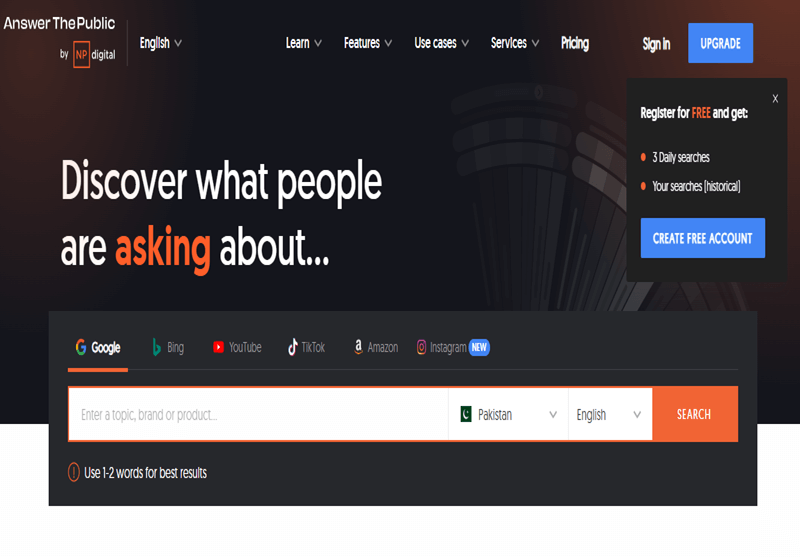
Short answer: Answer the Public (AnswerThePublic) is a keyword research tool that takes one seed term and shows the questions, prepositions, comparisons and alphabetical phrases people type around it, drawn from search engine autocomplete. It is best for finding content ideas, FAQ questions and long-tail angles. Paid plans add search volume and CPC, but you should still check demand and intent in another tool before writing.
This guide is for bloggers, content writers and SEOs who have heard of AnswerThePublic and want to know what it actually does, whether the free version is enough, and how to turn its wall of questions into pages that rank. I will show how I use it in a real research workflow, where it misleads people, and how it compares with the other keyword tools you probably already have.
What is AnswerThePublic?
AnswerThePublic (often written Answer the Public) is a “search listening” tool, now part of Neil Patel’s NP Digital group. You type a short topic, choose a country and language, and it returns hundreds of phrases people have searched that contain your term. Its trademark is the search wheel: a visual cloud of questions grouped around the seed keyword. You can switch to a plain list or table view and export the results.
The data comes from autocomplete, the predictions a search engine shows as you type. Google’s own help page on how autocomplete works says predictions reflect real searches, and are shaped by the language of the query, location, trending interest and the searcher’s past searches. That is both the strength and the limit of the tool: the phrases are real, but autocomplete filters out some topics and does not tell you on its own how many people search each one.
What the results show
| Group | Example for “solar panels” | What it is good for |
|---|---|---|
| Questions (who, what, why, how, can, will…) | how much do solar panels cost in Pakistan | Blog posts, FAQ sections, featured snippet targets |
| Prepositions (for, with, without, near, to…) | solar panels for home without battery | Specific use cases and landing page angles |
| Comparisons (vs, or, and, like) | mono vs poly solar panels | Comparison guides and buying advice |
| Alphabeticals (A to Z) | solar panels net metering | Subtopics you had not thought of |
| Related | solar inverter price | Adjacent topics for a cluster |
These example phrases are illustrations of the patterns, not exported data. Your own results will vary by country and language setting.
Rather have an expert do this for you?
Hand it over and get back to running your business.
How to use AnswerThePublic, step by step
- Pick a short seed. One or two words work best (“solar panels”, “keto diet”). Long seeds return little, because fewer searches contain the whole phrase.
- Set the country and language. This matters more than people think. Results for Pakistan in English differ from the US, and Urdu or Roman Urdu searches will not appear in an English setting.
- Scan the wheel, then switch to the list. The visual is good for spotting themes; the list is easier to sort and copy.
- Export to a spreadsheet. Paste everything into one sheet with columns for phrase, intent, volume and target page.
- Remove noise. Delete duplicates, brand searches you will never target, and phrases that only make sense in another country.
- Add volume and difficulty. Use the paid plan’s data, Google Keyword Planner or another tool, and check Search Console for queries you already appear for.
- Group by intent and topic. Questions that one good page can answer belong together; I explain how in my guide to keyword mapping.
- Check the live results page. Search the main phrase and see what type of page ranks before you decide on the format.
From AnswerThePublic export to content plan: checklist
- Seed is one or two words: broad enough to return a full wheel.
- Country and language match your audience: run a second search for each market you target.
- Results exported to one sheet: with columns for intent, volume and target URL.
- Duplicates and off-topic phrases removed: including competitor brand terms.
- Volume checked in a second source: so you are not writing for zero-demand phrases by accident.
- Each phrase tagged with intent: informational, commercial, transactional or local.
- Phrases grouped into page-sized clusters: one page per intent, not one page per phrase.
- Existing pages checked first: update a page you already have before creating a new one.
- SERP checked for each cluster: note the format that ranks and any “People also ask” box.
- Best questions saved as H2s or FAQs: written in the searcher’s own words.
- Published pages tracked in Search Console: review new queries after four to eight weeks.
Ticks are saved in your browser, so you can work through a big export over a few sessions.
Worked example: turning one search into a content cluster
Say a Lahore solar installer runs “solar panels” with Pakistan selected. After cleaning, the useful phrases fall into four groups: costs and prices, system types (on-grid, off-grid, hybrid), net metering, and comparisons (mono vs poly, specific brands). That becomes one pillar page on solar for homes, a cost guide, a net metering guide and a comparison article, each answering its own group of questions, with the most-asked questions as FAQs. The service page for installation in Lahore stays separate because its intent is commercial and local. Twenty questions become four or five pages, not twenty thin ones.
Free vs paid: what you get
The free version gives a limited number of searches per day under a fair-use limit, which is enough to try it or research an occasional topic. According to the AnswerThePublic pricing page in 2026, paid plans are billed by the number of searches per month: 100 on Starter, 200 on Growth and 300 on Business, with more users on the higher plans, and all three include search volume and CPC data. Check the page for current prices, as they change and are shown in US dollars.
My rule of thumb: if you run a handful of content projects a year, the free version plus a volume tool is enough. If you plan content every week or for several clients, the paid plan’s volume data and saved searches save real time.
Where AnswerThePublic misleads people
When I review content plans that were built from this tool, I see the same problems again and again:
- One page per question. “How much do solar panels cost”, “solar panel price” and “cost of solar panels” are one intent. Writing three pages creates keyword cannibalisation and thin content.
- Treating every phrase as worth writing about. Autocomplete shows that people searched something, not how many. Most of the long tail is tiny, which is fine for a section or FAQ, but rarely justifies a whole page alone. My guide to long-tail keywords explains when they do.
- Ignoring the results page. Some questions are answered directly in Google, so a page targeting them may get few clicks.
- Wrong country setting. Pakistani businesses often research with the default settings and end up writing for American searchers.
- Missing local language searches. Many Pakistani searches are in Roman Urdu (“solar panel ki qeemat”). Run separate searches for the variants your customers use and check Search Console for the exact wording.
AnswerThePublic vs other keyword tools
| Tool | Best at | Weak at | Use it for |
|---|---|---|---|
| AnswerThePublic | Questions and phrasing around a topic | Prioritising; few searches on lower plans | Content ideas, FAQs, briefs |
| Google Keyword Planner | Volume ranges straight from Google | Broad ranges without an active ad account; few questions | Checking demand |
| Google Search Console | Queries you already get impressions for | Only shows what your site already appears for | Updating and expanding existing pages |
| “People also ask” and related searches | Questions Google already connects to your topic | Manual and slow to collect | Checking intent and FAQ ideas |
| Semrush or Ahrefs | Volume, difficulty, competitors’ keywords | Expensive for small sites | Prioritising and competitor gaps |
| Keywords Everywhere | Volume shown inside Google as you search | Paid credits for full data | Quick checks while browsing |
For a deeper look at the browser extension, see my guide to Keywords Everywhere and its alternatives. To find the queries you already rank for, use the Search Console performance report.
Turning questions into content that ranks
- Use the exact question as a heading where it reads naturally, and answer it in the first sentence or two below. That format suits featured snippets and AI answers.
- Cover the cluster, not just the keyword. A page that answers the five questions people ask together is more useful than five thin pages. My guide to topic clustering shows how to structure this.
- Feed it into a brief. The cleaned question list is the core of a good SEO content brief.
- Use it beyond blogs. The same questions make good YouTube video topics, social posts and sales FAQs.
Frequently asked questions
Is AnswerThePublic free?
There is a free version with a small daily search limit. Paid plans give a set number of searches per month and add search volume and CPC data.
Where does AnswerThePublic get its data?
From search engine autocomplete predictions. Google says these reflect real searches, which is why the phrasing is useful, but autocomplete leaves out some topics and is affected by location and trends.
Does AnswerThePublic show search volume?
The paid plans include search volume and CPC. On the free version, check demand in Google Keyword Planner, Search Console or another keyword tool.
What are good alternatives to AnswerThePublic?
Google’s own “People also ask” and related searches are free. AlsoAsked focuses on question relationships, and Semrush, Ahrefs and Keywords Everywhere add volume and difficulty.
Is AnswerThePublic good for local SEO?
It helps with questions customers ask before they buy, if you set the right country and language. For “near me” and city-level demand, Search Console and your Google Business Profile insights are more useful.
Sources
- Google Search Help, “How Google autocomplete predictions work” (accessed 2026).
- AnswerThePublic, pricing page (accessed 2026).
- Ahrefs, “Long-tail keywords: what they are and how to get search traffic from them” (2021, updated 2026).
If you have a long list of questions and are not sure which deserve their own pages, my wider keyword research guide walks through prioritising them, and my on-page optimisation service can turn the plan into pages. You can also get in touch with a question.
Request received
Thank you! Saad will contact you within the next 24 hours.
Keep an eye on your phone and inbox.