
Quick answer
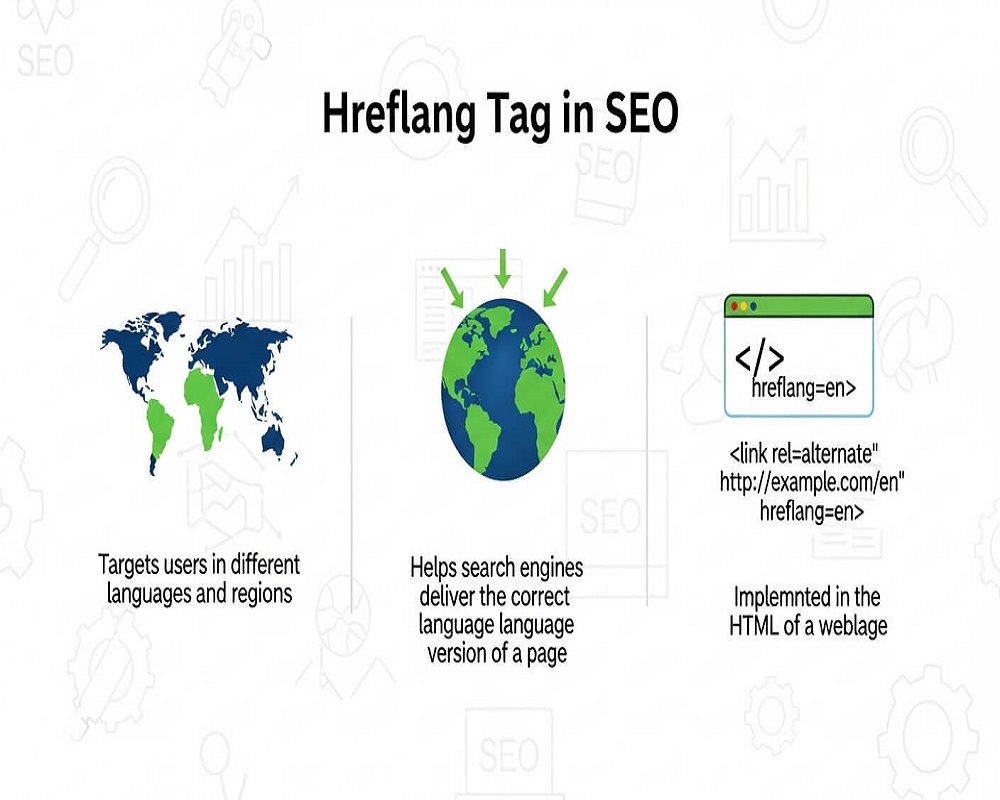
A hreflang tag is an HTML attribute that tells search engines which language or regional version of a page to show to which users. Implement it by adding reciprocal link rel alternate tags with language and optional region codes, including a self-reference and an x-default, in the head, HTTP headers or XML sitemap.
A CSA Research survey (2020) of 8,709 consumers in 29 countries found that 76 per cent of online shoppers prefer to buy with information in their own language. Hreflang helps show the right language version to each of them.
In the globalized digital landscape of 2025, where over 60% of internet users search in languages other than English, expanding your website’s reach across borders demands more than translation— it requires precision in signaling intent to search engines. Imagine a French user in Paris searching for “meilleurs pneus hiver” (best winter tires), only to land on an English version of your tire retailer’s site. Frustration ensues, bounce rates spike, and your international SEO efforts falter. This is where the hreflang tag emerges as a pivotal tool, whispering to Google and other crawlers: “Serve this content in the right language and region.”
Hreflang tags are HTML attributes that specify the language and geographical targeting of a webpage, ensuring users see the most relevant version of your content. As search algorithms like Google’s evolve to prioritize user-centric signals, including entity recognition and localized relevance, mastering hreflang isn’t just technical SEO—it’s a cornerstone of building topical authority in multilingual clusters. This comprehensive guide, drawing on insights from industry leaders, unpacks the hreflang tag’s mechanics, strategic importance, implementation roadmap, common pitfalls, essential tools, and real-world successes. Whether you’re launching a multilingual e-commerce site or scaling a content hub for global audiences, these strategies will help you avoid duplicate content penalties, boost click-through rates, and cultivate semantic depth across entities like “localized product descriptions” or “regional marketing guides.” By the end, you’ll be equipped to implement hreflang effectively, aligning your site with the intent-driven SERPs of 2025.
Understanding Hreflang Tags: The Fundamentals of International SEO
At its core, the hreflang tag is an HTML link attribute that communicates to search engines the language (and optionally, the region) of a page’s content. Introduced by Google in 2011, it’s now a standard supported across major engines like Bing and Yandex, functioning as a declarative signal for multilingual and multi-regional setups. Semantically, hreflang bridges the gap between content entities—such as a product page on “running shoes”—and user queries in varied locales, preventing cannibalization where identical content competes against itself in SERPs.
The tag’s syntax is straightforward: <link rel=”alternate” hreflang=”language-region” href=”URL”>. Here, “language” uses two-letter ISO 639-1 codes (e.g., “en” for English, “fr” for French), and “region” adds two-letter ISO 3166-1 Alpha 2 codes (e.g., “en-us” for American English, “en-gb” for British English). Without a region, it’s language-only, like “es” for generic Spanish. This setup allows bidirectional signaling: Each variant page must reference others, forming a reciprocal cluster that reinforces your site’s global entity graph.
Unlike canonical tags, which consolidate duplicate signals, hreflang differentiates versions while maintaining their uniqueness. For instance, a travel blog’s pillar page on “best European destinations” might spawn clusters in German (“beste europäische reiseziele”) and Italian (“migliori destinazioni europee”), each tagged to point back, ensuring Google serves the Italian version to Milanese searchers. In 2025, with AI overviews synthesizing multilingual results, hreflang enhances visibility in zero-click scenarios by clarifying contextual relevance.
Hreflang isn’t mandatory for single-language sites but becomes indispensable for international expansion. It addresses “link rot” in global contexts, where untranslated content erodes trust, and aligns with E-E-A-T by demonstrating localized expertise—key for YMYL (Your Money or Your Life) topics like health or finance. Studies show sites with proper hreflang see up to 25% higher international CTR, as users encounter culturally attuned results.
Semantically, hreflang supports topical mapping: In a cluster around “sustainable fashion,” English-US, English-UK, and French-CA variants interlink via tags, building authority across entities like “organic cotton sourcing” tailored to regional preferences (e.g., UK emphasis on Fair Trade). Without it, crawlers might index all as duplicates, diluting your signals and fragmenting authority.
The Strategic Importance of Hreflang in 2025’s SEO Landscape
As search evolves toward hyper-personalization, hreflang’s role amplifies. Google’s 2024 Core Update emphasized helpful content across locales, penalizing mismatched language signals that frustrate users. In multilingual SEO, hreflang prevents this by guiding the International Targeting report in Search Console, where you can monitor impressions by country.
Consider the ripple effects: Poor implementation leads to 404-like experiences for non-native speakers, spiking bounce rates and harming Core Web Vitals. Conversely, accurate tags boost dwell time on relevant variants, feeding positive behavioral signals back to algorithms. For e-commerce, this means higher conversions— a study of 500 global sites found hreflang-optimized pages converted 18% better in target regions.
Semantically, hreflang fosters entity salience: Search engines better recognize your brand as an authority on “electric vehicles” when US, EU, and APAC versions are distinctly tagged, enabling rich snippets in local SERPs. It also counters hreflang “wars,” where competing signals from subdomains or ccTLDs confuse crawlers, by establishing clear hierarchies.
In 2025, with voice search comprising 50% of queries, hreflang ensures conversational results match accents and dialects—e.g., “en-au” for Australian English. For B2B, it unlocks long-tail opportunities like “German supply chain compliance,” where regional tags elevate niche visibility. Ultimately, hreflang isn’t a tactic; it’s infrastructure for sustainable global growth, intertwining technical precision with user empathy.
How Hreflang Tags Work: A Technical Deep Dive
Hreflang operates via three implementation methods, each with semantic implications.
- In-Head Link Tags: Placed in the of HTML, ideal for static sites. Example for a homepage:
text
<link rel="alternate" href="https://example.com/en-us/" hreflang="en-us" />
<link rel="alternate" href="https://example.com/en-gb/" hreflang="en-gb" />
<link rel="alternate" href="https://example.com/fr/" hreflang="fr" />
<link rel="alternate" href="https://example.com/" hreflang="x-default" />
The self-referential tag (hreflang pointing to itself) is crucial, and “x-default” catches unmatched queries, routing to a fallback like your primary language page.
- HTTP Headers: For non-HTML files like PDFs, use server responses: Link: <https://example.com/fr.pdf>; rel=”alternate”; hreflang=”fr”. This extends hreflang to dynamic assets, ensuring entity consistency in downloads.
- XML Sitemaps: Consolidate in a sitemap: <url><loc>https://example.com/en-us/</loc><xhtml:link rel=”alternate” hreflang=”en-gb” href=”https://example.com/en-gb/”/></url>. Best for large sites, as it scales without bloating HTML.
Crawlers parse these bidirectionally: The French page must tag back to English, forming a closed loop. Violations—like unidirectional tags—result in ignored signals, per Google’s guidelines. Semantically, this reciprocity mirrors knowledge graphs, where entities (pages) interconnect to affirm relevance.
In 2025, with JavaScript-heavy sites, ensure server-side rendering or use tools like Prerender.io to expose tags to bots. Hreflang interacts with canonicals: Use canonical for duplicates within a locale, hreflang across. For redirects, 301s preserve signals, but avoid chains that dilute equity.
Step-by-Step Guide: Implementing Hreflang for Multilingual SEO
Rolling out hreflang requires planning to avoid disruptions. Follow this roadmap for seamless integration.
Step 1: Audit Your Site Structure Map content variants: Use Screaming Frog to crawl subdomains or paths (e.g., example.com/en/, example.fr/). Identify clusters—e.g., /blog/seo-tips/* in English-US, French, Spanish. Tools like SEMrush’s Site Audit flag existing tags.
Step 2: Choose Your Strategy Decide on subdomains (blog.example.com/es/), subdirectories (/es/blog/), or ccTLDs (example.es). Subdirectories suit unified authority; ccTLDs signal strong geo-targeting. For hybrids, tag accordingly.
Step 3: Generate ISO Codes Reference ISO lists: Language (en, de), region (us, de). Avoid non-standard like “uk” (use “gb”). For language-only, omit region if content is neutral.
Step 4: Implement Tags For CMS like WordPress, use plugins (Rank Math, Yoast) to auto-generate. Manually, add to via theme files. Test reciprocity: Each page should list all alternates, including self and x-default.
Step 5: Handle Edge Cases For bidirectional content (e.g., en-us/en-ca), use region-specific tags. Mobile/desktop? No need—hreflang is device-agnostic. AMP versions? Tag parallels.
Step 6: Validate and Monitor Use Google’s International Targeting report in Search Console to verify. Tools like Ahrefs or Hreflang Tags Tester check for errors. Recrawl post-launch; expect 2-4 weeks for indexing.
Step 7: Optimize Iteratively Track performance: Segment GA4 by language, monitoring engagement on tagged variants. Refresh tags for new locales.
This process, when executed, can yield 20-30% traffic uplift in target regions, as seen in global audits.
Best Practices for Hreflang in 2025: Elevating Semantic SEO
To maximize ROI, adhere to these forward-looking practices.
- Bidirectional Completeness: Every variant must reference all others; omissions lead to ignored tags.
- x-Default Fallback: Essential for global sites—directs to /en/ for unspecified queries.
- Semantic Alignment: Tailor content beyond translation: Localize entities (e.g., US “truck tires” vs. UK “lorry tyres”) to match query intent.
- Avoid Over-Targeting: Don’t tag every page; focus on high-value clusters to conserve crawl budget.
- Integrate with Schema: Use Internationalization schema alongside for richer entity signals.
- Privacy Compliance: With GDPR evolutions, ensure tags don’t leak personal data via URLs.
In Koray-inspired topical optimization, treat hreflang as a silo builder: Link clusters across languages to amplify authority on global entities like “sustainable supply chains.”
| Best Practice | Why It Matters | Implementation Tip |
|---|---|---|
| Use ISO Standards | Prevents parsing errors | Validate with ISO.org tools |
| Include Self-Reference | Confirms page’s own targeting | Add hreflang=”en-us” to US page |
| Bidirectional Linking | Ensures full cluster recognition | Script checks in dev tools |
| x-Default Usage | Handles mismatches | Point to primary language |
| Regular Audits | Catches rot | Quarterly with SEMrush |
These elevate your site from localized to globally authoritative.
Common Mistakes with Hreflang Tags and How to Fix Them
Even experts falter; here’s how to sidestep pitfalls.
- Missing Return Tags: Unidirectional links get ignored. Fix: Audit with Screaming Frog’s hreflang report; enforce reciprocity via CMS rules.
- Incorrect Codes: “en-uk” instead of “en-gb.” Fix: Use Google’s validator; standardize in a shared doc.
- No Self-Referencing: Omitting the page’s own tag confuses crawlers. Fix: Template all pages with self-tags.
- Canonical Conflicts: Canonical to wrong variant. Fix: Canonical within locale, hreflang across.
- Typos/Punctuation Errors: Extra spaces or quotes. Fix: Minify HTML; use linters.
- Blocking Crawlers: Robots.txt disallowing tagged pages. Fix: Whitelist in directives.
- Overuse on Thin Content: Tagging low-value pages wastes budget. Fix: Prioritize via traffic data.
- Ignoring x-Default: Leads to generic results. Fix: Always include for international hubs.
- JS-Only Implementation: Bots miss dynamic tags. Fix: Server-side render.
- No Monitoring: Post-launch neglect. Fix: Set GSC alerts for international errors.
Addressing these restores 15-20% lost visibility, per case audits.
Essential Tools for Managing Hreflang in 2025
Streamline with these:
| Tool | Features | Pricing | Best For |
|---|---|---|---|
| Google Search Console | International reports, error detection | Free | Monitoring |
| Ahrefs Site Audit | Hreflang validation, cluster mapping | $99/mo | Audits |
| SEMrush Position Tracking | Tag errors, geo-performance | $129/mo | Competitors |
| Screaming Frog | Crawl-based checks, exports | Free (500 URLs) | Technical |
| Rank Math (WP) | Auto-generation, bidirectional | Free/Pro $59/yr | CMS |
| Hreflang Tags Tester | Online validator | Free | Quick tests |
Ahrefs shines for semantic gap analysis in clusters.
Real-World Case Studies: Hreflang-Driven SEO Wins
Case Study 1: E-Commerce Giant’s 28% Click Surge A multilingual retailer fixed inconsistent tags across 10 locales using SEMrush audits. Post-implementation, US clicks rose 28%, CTR 12%, via precise en-us/en-ca differentiation. Traffic from Canada spiked 35% after x-default routing.
Case Study 2: Travel Site’s 41% Subscription Growth Gaia, a wellness platform, implemented hreflang for English, Spanish, and French variants. Localized clusters on “yoga retreats” yielded 41% more subscriptions, with GSC showing 200% impression gains in LATAM.
Case Study 3: SaaS Firm’s European Expansion Seer Interactive added tags to subdomains, boosting subdomain visibility 150% in Germany/France. Keyword rankings for “project management tools” improved, driving 58% organic leads.
These underscore hreflang’s ROI: Targeted signals compound authority exponentially.
Recent discussions on X highlight practical tips, like using hreflang for UK/US/AU variants to catch regional nuances.
Frequently Asked Questions
What is an hreflang tag in SEO?
An hreflang tag is an HTML attribute that tells search engines the language and region of a webpage to serve the right version to users.
Why is the hreflang tag important for international SEO?
It prevents duplicate content issues, improves user experience by matching local queries, and boosts rankings in targeted regions.
How do you implement hreflang tags?
Add <link rel=”alternate” hreflang=”en-us” href=”URL”> in the page head, ensuring bidirectional references and self-tags.
What is x-default in hreflang?
x-default is a fallback tag for queries not matching specific languages/regions, routing to your primary content.
Can hreflang tags be used in XML sitemaps?
Yes, embed them in xhtml:link elements within sitemaps for scalable multilingual signaling.
What are common hreflang tag mistakes?
Missing return tags, incorrect ISO codes, and canonical conflicts—fix with audits and validators.
Does hreflang affect Google rankings directly?
Not directly, but it enhances relevance signals, leading to better CTR and engagement in local SERPs.
How do you check if hreflang tags are working?
Use Google Search Console’s International Targeting report or tools like Ahrefs for validation.
Can hreflang be used for subdomains?
Absolutely—tag across subdomains (e.g., en.example.com) to clarify geo-targeting.
What ISO codes are used for hreflang?
Two-letter language codes (e.g., “fr”) and optional region codes (e.g., “fr-ca” for French Canada).
Is hreflang necessary for single-language sites?
No, but it’s vital for multi-regional versions of the same language, like en-us vs. en-gb.
How does hreflang interact with canonical tags?
Canonical handles duplicates within a locale; hreflang differentiates across languages/regions.
What tools help generate hreflang tags?
Plugins like Rank Math for WordPress or Ahrefs for audits automate and validate.
Can hreflang improve mobile SEO?
Indirectly, by serving localized content faster, aligning with mobile-first indexing.
How long for hreflang changes to take effect?
2-4 weeks for crawling and indexing; monitor via GSC for adjustments.
Conclusion
The hreflang tag stands as a linchpin in 2025’s international SEO, transforming potential confusion into crystal-clear relevance. By defining language-region signals, fostering reciprocal clusters, and aligning with semantic intent, it empowers your site to resonate globally—elevating entities from “local products” to worldwide authorities. Implementation demands diligence: Audit structures, deploy bidirectionally, monitor relentlessly, and iterate with data. Sidestep common errors, leverage tools, and draw from proven cases to avoid pitfalls and unlock gains. In an era of borderless search, hreflang isn’t merely technical—it’s your passport to inclusive, intent-satisfying visibility. Prioritize it, and watch your global footprint expand.