
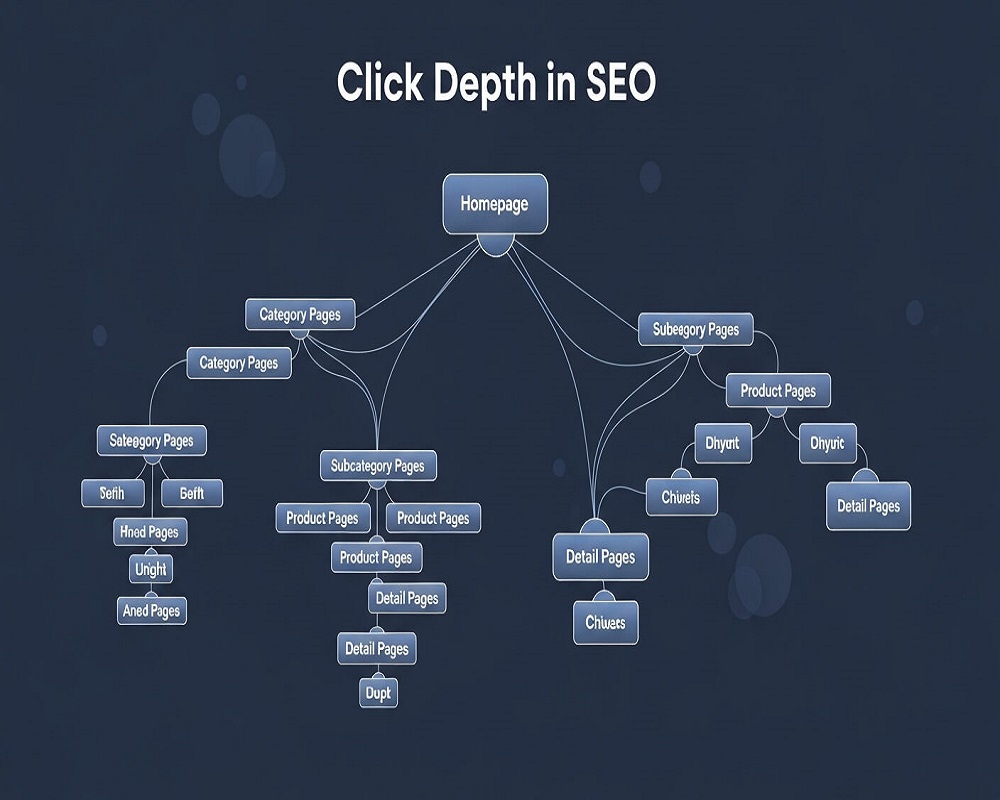
Short answer: Click depth is the number of clicks it takes to reach a page from the homepage, following normal links. The homepage is depth 0, pages it links to are depth 1, and so on. To improve it, link your most important pages from the homepage, menus and hub pages, flatten deep category trees, fix long pagination chains and add contextual internal links, aiming for key pages within about three clicks.
This guide is for site owners, content managers and SEOs who suspect good pages are buried too deep to be found. You will learn what click depth is, how Google treats it, how to measure it with a crawler in under an hour, and the fixes I use most often when I audit blogs and online shops, including a calculator that shows how pagination quietly pushes products ten or more clicks down.
What click depth means
Click depth (also called page depth or link depth) counts the shortest path of clicks from the homepage to a page, using links a person or a crawler can follow. If your homepage links to your blog, and the blog index links to an article, the article sits at depth 2. If the same article is also linked in the main menu, its depth drops to 1, because depth is always the shortest route.
Three points trip people up:
- It is not the URL path.
/blog/2026/10/post/can sit at depth 1 if the homepage links to it, while/post/can sit at depth 7 if nothing but a paginated archive reaches it. - It only counts crawlable links. Google can generally only follow
<a>elements with anhref, as its link best practices explain. Buttons that load content with JavaScript, internal search results and filters that do not change the URL do not create a path. - Orphan pages have no depth at all. A page reachable only through the XML sitemap is an orphan. Google may still find it, but it receives no internal link signals and users cannot reach it.
Click depth vs crawl depth vs URL depth
| Term | What it measures | Where you see it | Why it matters |
|---|---|---|---|
| Click depth | Shortest number of clicks from the homepage | “Crawl Depth” column in Screaming Frog, “depth” in Sitebulb and most site audit tools | Signals importance and shapes how easily pages are discovered |
| Crawl depth | How far a bot actually goes into a site in practice | Server log files, Search Console Crawl Stats | Shows whether deep pages are really being fetched |
| URL depth | Number of folders in the URL | The address bar | Mostly a usability and reporting matter; Google does not count slashes |
Most tools label click depth as “crawl depth”, which is why the terms get mixed up. In this guide I use click depth for the link distance and crawl depth for what bots actually do, which you can only see in log file analysis.
Does click depth affect SEO?
Yes, though indirectly. Google has never published a “depth” ranking factor, but it has explained the logic. In a 2018 office-hours answer reported by Search Engine Journal, John Mueller said Google does not count slashes in URLs and that what matters is how many links you have to click through to reach the content. Pages one click from the homepage get “a little bit of weight” because linking them there tells Google you consider them important.
In practice, depth affects three things:
- Discovery and recrawling. Crawlers follow links outward from strong pages. A page at depth 2 is found and revisited sooner than one at depth 9, which matters most for new products, updated articles and large sites where crawl budget is a real constraint.
- Internal link signals. Each extra layer usually means fewer internal links pointing at a page and less authority flowing to it. Deep pages tend to be weakly linked pages.
- People. If a visitor needs six clicks to find your returns policy or a service page, many will leave or ask on WhatsApp instead.
Depth is a symptom as much as a cause. When I find a valuable page at depth 8, the real problem is usually that nothing relevant links to it. That is why the Ahrefs study of about 14 billion pages is a useful reminder: most pages on the web get no Google traffic, and weak linking is one of the common reasons it names, alongside lack of search demand and intent mismatch. Fixing depth will not rescue a page nobody searches for.
Rather have an expert do this for you?
Hand it over and get back to running your business.
What is a good click depth?
There is no official number. The “three-click rule” is a usability rule of thumb, not a Google rule, and on a 50,000-product shop it is not always achievable. I use these working targets instead:
| Page type | Working target | Notes |
|---|---|---|
| Main services, top categories, key landing pages | Depth 1 | Link from the main menu or homepage |
| Subcategories, cornerstone articles, location pages | Depth 2 | Link from a hub or category page |
| Products, most blog posts | Depth 3 to 4 | Contextual links and related items close the gap |
| Archive, tag and old paginated pages | Depth 5 or more is acceptable | Fine if they are not pages you want to rank |
| Any indexable page you care about | Never orphaned | At least one crawlable internal link |
The goal is not a flat site where everything is linked from the homepage. A homepage with 400 links tells nobody what matters. The goal is that depth reflects priority: your most valuable pages are the easiest to reach.
How to measure click depth
A desktop crawler gives you the numbers quickly. This is the process I follow:
- Crawl from the homepage with Screaming Frog, Sitebulb or a similar tool, using the canonical version (https, with or without www). Set the crawler to render JavaScript if your menu is built with it, then compare with a text-only crawl; if depths differ a lot, your navigation depends on scripts.
- Export URL, depth, indexability, inlinks and organic clicks. Pull clicks for each URL from the Search Console Performance report (or via the API) and join them in a spreadsheet.
- Filter to indexable pages at depth 4 or more. Sort by business value: revenue pages, service pages and articles with impressions but few clicks first.
- Find orphans. Compare the crawl with your XML sitemap and analytics landing pages. URLs in the sitemap but missing from the crawl have no internal links.
- Look at the path. For each deep page, check how the crawler reached it. Usually it is “page 14 of the category” or “tag archive”, which tells you exactly which fix is needed.
On small sites you can sanity check by hand: open the homepage, try to reach your five most important pages, and count the clicks. If you hesitate about where to click, users will too.
Pagination: the hidden cause of deep pages
The single biggest cause of deep pages I see on online shops and long-running blogs is pagination that only offers “Next” links. A category with 240 products shown 24 at a time has 10 pages. If each page only links to the next, the products on the last page are about 11 clicks below the category. Numbered pagination links, “view all” options for moderate lists and subcategories all shorten that chain. The calculator below shows the effect for your own numbers; my guide to handling pagination in SEO covers the implementation.
Pagination click depth calculator
How to read it: this assumes the only route to items is the paginated list and that each page links to the next k pages. Links to the last page, related-item widgets and menu links can make real depth shallower, so confirm with a crawl. With the defaults (240 items, 24 per page, Next only) the last items sit 12 clicks from the homepage; linking five pages ahead brings them to 5.
How to improve click depth: the fixes that work
1. Link priority pages from the homepage and main menu
Decide which 5 to 15 pages earn the most money or leads and make sure they sit at depth 1. On service sites that usually means each main service in the menu. On shops it means top categories and, during a season (lawn collections, Eid, back to school), the seasonal category.
2. Build hub pages
A hub links to every article or subpage on one topic and is itself linked from the menu. That puts the whole cluster within two or three clicks and makes the topic obvious to Google. This is the core of topical authority work and of good site architecture.
3. Add contextual internal links
Links inside the body of related pages shorten depth and pass relevance at the same time. When I publish a new article, I add links to it from two or three older, already-ranking posts on the same subject the same day, rather than waiting for it to drift down the blog index. My guide to internal linking covers anchor text and placement.
4. Flatten category trees
Homepage, Men, Clothing, Shirts, Formal, Cotton, product is six levels. Most shops can merge layers into Men, Formal shirts, product. Use filters for attributes like fabric, but keep them crawl-safe; see my guide to faceted navigation.
5. Use breadcrumbs
Breadcrumbs give every deep page a link back up the tree and help users orient themselves. Google’s breadcrumb documentation recommends breadcrumbs that represent a typical user path rather than mirroring the URL structure, which is the same principle as click depth.
6. Add related items and an HTML sitemap where useful
“Related products” and “related articles” blocks create sideways links between deep pages. An HTML sitemap page linked from the footer can bring hundreds of pages to depth 2 on small and medium sites. An XML sitemap helps discovery but does not change click depth, because it is not a link a user follows.
7. Fix broken paths and redirect chains
A broken link in the menu or a hub can cut off a whole branch. Run your key templates through my broken link checker after every redesign.
Click depth audit checklist
- Crawl from the homepage: with rendering on and off, and note any pages that only appear with JavaScript.
- List your priority pages: the 5 to 15 pages that bring most leads or revenue.
- Check priority pages are at depth 1 or 2: link them from the menu, homepage or a hub if not.
- Filter indexable pages at depth 4 or more: and sort by impressions and business value.
- Find orphan pages: compare the crawl with the XML sitemap and analytics landing pages.
- Check pagination: numbered links, sensible items per page, crawlable page URLs.
- Review category nesting: merge layers that add clicks without helping users.
- Add breadcrumbs: on posts, categories and products, with matching structured data.
- Add contextual links: two or three from related, ranking pages to each deep priority page.
- Fix broken links and chains: in menus, hubs and footers first.
- Recrawl and compare: confirm the depth of priority pages fell, then monitor clicks for 4 to 8 weeks.
Ticks are saved in your browser, so you can work through the audit over several sessions.
Mistakes I see when people try to reduce click depth
- Linking everything from the footer. A footer with 200 links flattens depth on paper but says nothing about priority, and users ignore it.
- Mega menus with every subcategory. Useful for some shops, but on mobile they often collapse into scripts that crawlers handle poorly. Test with a text-only crawl.
- Treating URL folders as depth. Rewriting URLs to remove folders changes nothing about clicks, and the redirects create risk for no gain.
- Relying on internal search. Search results pages are usually noindexed and give crawlers no path to products.
- Fixing depth for pages that should not exist. Thin tag pages and old near-duplicate posts are better merged or removed, which also reduces depth for everything else.
Frequently asked questions
What is click depth in SEO?
Click depth is the minimum number of clicks needed to reach a page from the homepage using normal links. The homepage is 0, pages it links to are 1, and each extra step adds one. It helps show how easily users and crawlers can find a page and how important your internal linking suggests it is.
What is a good click depth?
Keep your most important pages at depth 1 or 2 and most indexable content at 3 to 4. The three-click rule is a guideline, not a Google requirement; very large shops will have some pages deeper, which is fine for low-priority items.
Is click depth a Google ranking factor?
Not as a named factor. Google has said it pays attention to how many clicks it takes to reach content from the homepage rather than to URL folders, because linking from the homepage signals importance. The effect works through crawling and internal links.
Does an XML sitemap fix deep pages?
No. A sitemap helps Google discover URLs, but it is not a link that users follow and it passes no internal link signals. Deep or orphaned pages still need real internal links.
How do I find my site’s click depth?
Crawl the site from the homepage with a tool such as Screaming Frog or Sitebulb and look at the crawl depth column, then filter for indexable pages at depth 4 or more and compare them with your sitemap to find orphans.
Does click depth matter for small websites?
Less than for large ones. A 30-page site is usually shallow by default. It still matters that every service page is in the menu and that no page is orphaned.
Sources
- Search Engine Journal, “Google: Click Depth Matters More for SEO than URL Structure” (2018).
- Ahrefs, “96.55% of Content Gets No Traffic From Google. Here’s How to Be in the Other 3.45%” (2023).
- Google Search Central, “SEO link best practices for Google” (accessed 2026).
- Google Search Central, “Breadcrumb (BreadcrumbList) structured data” (accessed 2026).
If your crawl shows important pages buried deep, my technical SEO services include a full architecture and internal linking review, or you can send me your site and I will point out the biggest gaps.
Request received
Thank you! Saad will contact you within the next 24 hours.
Keep an eye on your phone and inbox.